 Emsisoft
Browser Toolbars – erst Segen, dann Fluch
Bestimmt ist Ihnen bei der Installation von Software das eine oder andere Mal der Hinweis aufgefallen, dass eine Toolbar mitinstalliert werden sollte. Waren die ersten Vertreter dieser Gattung noch nützlich und beliebt, so bricht heutzutage eine wahre Flut an unsinnigen und nervenden Toolbars über die Gemeinschaft der Internetnutzer herein. Der Grund dahinter ist – wie so oft – ein wirtschaftlicher. In diesem Artikel erklären wir Ihnen, was Toolbars eigentlich sind und wieso es davon inzwischen so unglaublich viele gibt.
Das Wort Toolbar leitet sich vom englischen Wort „tool“ ab, welches „Werkzeug“ bedeutet. Eine Toolbar ist also so etwas wie ein Werkzeuggürtel für den Browser, der den Schnellzugriff auf häufig verwendete und allgemein nützliche Funktionen zur Verfügung stellen soll. Der Grundgedanke ist also eigentlich ein guter und entsprechend gibt es auch sehr hilfreiche Toolbars. So verwenden Millionen von Menschen beispielsweise die Google Toolbar, um für die fixe Suche in den Weiten des Internets nicht erst die Homepage des Konzerns ansteuern zu müssen.
Doch seit ein paar Jahren gibt es Toolbars an jeder virtuellen Ecke. Sei es bei der Einrichtung eines neuen Programms, einem Download oder gar der Installation eines Treibers, regelmäßig werden wir Nutzer zur Installation der kleinen Werkzeugleisten aufgefordert. Einer der häufigsten Vertreter ist die Ask Toolbar, welche zur Suchmaschine Ask.com gehört. Etliche Software Hersteller bieten die Installation gekoppelt an die ihrer eigenen Produkte an, darunter auch sehr viele bekannte Namen wie beispielsweise der Brennprogrammriese Nero.
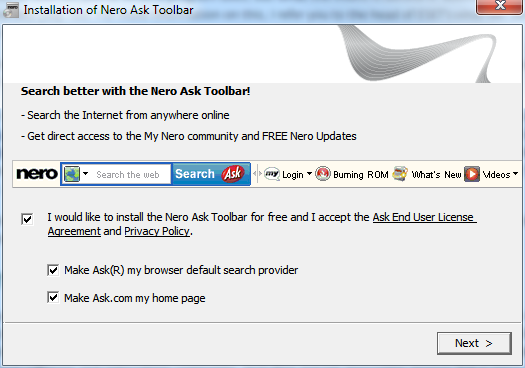
Aufforderung zur Installation der Ask Toolbar bei der Nero Brennsoftware
Warum das so ist? – Ganz einfach, Ask.com bietet den Herstellern pro Installation zwischen ein und zwei US-Dollar an. In Anbetracht der immensen Downloadzahlen kommt damit eine ganze Stange Geld zusammen; ein guter Nebenverdienst, dem nur wenige Firmen widerstehen. Für Ask selber wird sich diese Ausgabe schnell rentieren, denn wird die Suchmaschine erst einmal genutzt, bringen Werbeeinblendungen bares Geld.
Nun kann man natürlich fragen, was daran verwerflich oder schlimm sein sollte. Immerhin bewegt sich Ask noch im legalen Rahmen, schließlich ist der Nutzer nicht verpflichtet die Toolbar zu installieren. Doch wie im Bild ersichtlich müssen ganze drei Checkboxen deaktiviert werden, damit die Ask Toolbar nicht installiert wird und auch die Startseite und Standardsuche des Browsers unangetastet bleiben. Unaufdringlich sieht anders aus. Noch dazu wird kaum jemand die Lizenzvereinbarung und Datenschutzrichtlinien durchlesen. Gerade die Installation der Toolbar, also einer normalen Software, ermöglicht Ask aber Zugriff auf den Rechner und damit das Sammeln von statistischen Daten und Nutzerprofilen.
Auch große Softwarekonzerne sammeln Ihre Nutzerdaten
Dabei ist Ask ein weit verbreiteter, aber dabei keineswegs seltener Fall. Sogar die vom Softwaregiganten Microsoft betriebene Suchmaschine Bing erregte im letzten Jahr große Aufmerksamkeit, da die dazugehörige Bing Toolbar im Verruf steht, Google Suchergebnisse zu stehlen. Seit dem Internet Explorer 8 wird Bing dort als Empfehlung mitinstalliert und hat so logischerweise Zugriff auf alles was im oder über den Browser passiert. Microsoft kann also theoretisch aufzeichnen, welche Suchbegriffe beispielsweise in Google eingegeben und welche Links dann angeklickt werden. Microsoft bestreitet den Datendiebstahl natürlich.
Sofern Sie den Internet Explorer 8 installiert haben, haben Sie übrigens mit ziemlicher Sicherheit der Datensammelei ebenfalls zugestimmt – durch Teilnahme am „Consumer Experience Program“, also dem Microsoft-Programm zur Verbesserung der Benutzerfreundlichkeit. Denn auch diese Checkbox ist standardmäßig aktiviert und klingt ja auch erst mal recht vielversprechend. Letzten Endes erlauben Sie damit Microsoft, jede Ihrer Eingaben und Einstellungen im Browser zu überwachen und für eigene Zwecke zu speichern.
Wenn es schon bei den Softwareriesen so vonstattengeht muss man sich zu Recht fragen, wie es um die zahlreichen kleineren Toolbars bestellt ist. Mittlerweile bieten etliche Internet Seiten eigene Toolbars an, vom Online Shopping Anbieter, der einfachere Einkäufe verspricht, über diverse Foren bis hin zu vermeintlich nützlichen Anwendungen wie einer Wetter Anzeige oder einem Telefonbuch. Die gute Nachricht: reine Malware-oder Adware-Toolbars werden immer seltener. Das wird unter anderem daran liegen, dass sich erstens mit Werbung nicht mehr so viel Geld verdienen lässt wie noch vor einigen Jahren, und zweitens das Aufpoppen von Anzeigen nicht gerade unauffällig ist. Wenn sich am heimischen PC dauernd Fenster öffnen, wird jeder PC Benutzer misstrauisch und greift zum Virenscanner.
Vor allem aber lässt sich ethisch inkorrekt aber dafür wenigstens halbwegs legal und damit weitaus unauffälliger viel mehr Geld verdienen. Die erste Möglichkeit kennen Sie schon, das Aufzeichnen von Userdaten. Sei es zur eigenen technologischen Verbesserung oder auch zum Verkauf von stochastischen Daten oder dem gezielten Anbieten von bestimmten Produkten. Die Palette der Möglichkeiten ist groß und die Umsetzung äußerst lukrativ. Manche gehen dabei sogar noch einen Schritt weiter und wollen nicht nur die Browsernutzung aufzeichnen, sondern am liebsten auch noch die Aktivität in diversen sozialen Netzwerken inklusive derer Zugänge.
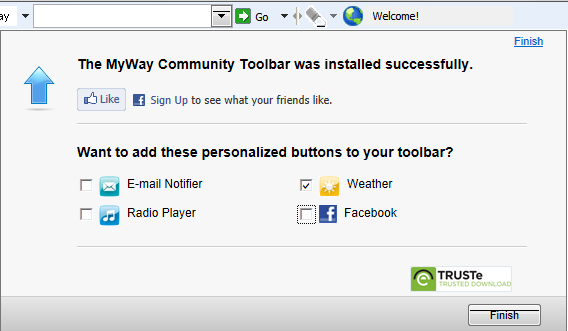
MyWay Toolbar mit dem Wunsch nach Zugriff auf persönliche Daten
Die allgemein als Adware klassifizierte MyWay Toolbar etwa möchte, dass Sie gleich auch Ihr Facebook- und Email-Passwort angeben – natürlich nur, um es Ihnen als Nutzer besonders bequem zu machen, versteht sich. MyWay behauptet zwar, dass in der neuesten Version keine Daten mehr aufgezeichnet werden, aber so oder so raten wir von der Nutzung solcher Toolbars und vor allem von integrierten Facebook- oder Email-Funktionen ab. Denn selbst bei einwandfreiem Betrieb durch den Autor besteht immer ein Sicherheitsrisiko. Es reicht im Zweifelsfall schon eine unsaubere Programmierung, um Hackern Tür und Tor zu Ihrem PC zu öffnen.
Das Geld lockt viele Firmen
 Wie eingangs beschrieben ist sowohl das Bundlen von Toolbars an Software als auch der Vertrieb von eigenen Toolbars äußerst lukrativ. Aufgrund der kritischen Nebeneffekte wie dem Eindringen in die Privatssphäre der Anwender und die Nähe zu Malware-Kategorien wie Adware und Trojanern darf man sich aber schon wundern, wenn ausgerechnet bekannte Anbieter von Sicherheitssoftware ebenfalls diverse Toolbars bei der Installation eigener Produkte anbieten. Die anerkannte Antiviren-Spezialistin „Donna“, Betreiberin des Security-Forums calendarofupdates.com, führt eine sehr interessante und stets aktuelle Liste dieser Unternehmen sowie eine „Hall of Shame“ von Programmen, die unbeliebte Zusatzmodule mitinstallieren (Englisch).
An dieser Stelle sei auch erwähnt, dass wir bei Emsisoft uns von derartigen Geschäftspraktiken ganz klar distanzieren, da uns unsere Integrität und die Sicherheit unserer Kunden wesentlich wichtiger sind als kurzfristiger Umsatz. Tipps zu interessanten und vor allem empfehlenswerten Produkten erhalten Sie von uns nach umfassender Prüfung per Newsletter.
Dabei werden wir regelmäßig von den Herstellern diverser Toolbars kontaktiert, denn unsere Malware-Scanner „Emsisoft Emergency Kit“ und „Emsisoft Anti-Malware“ erkennen viele dieser „unwanted“ Toolbars als Riskware. Die Autoren möchten aber selbstverständlich nicht, dass ihre Toolbars aus dem Verkehr gezogen werden und melden diese daher regelmäßig als Fehlalarm. In den letzten Wochen waren das unter anderem Dealio, SearchSuite, Rubar, Asksbar, Zugo und die Multibar – alles bekannte Toolbar-Vertreter, die sich mit der Verbreitung von Adware oder sogar Trojanern einen Namen gemacht haben.
Fazit
Installieren Sie nur dann eine Toolbar, wenn Sie diese wirklich möchten und brauchen. Prinzipiell stellt jede auf dem PC installiert und – wie in diesem Falle mit jedem Browserstart – aktiv ausgeführte Software ein Sicherheitsrisiko dar. Zudem fällt der Großteil der Toolbars durch das Sammeln von Nutzerdaten auf, was auf jeden Fall kritisch hinterfragt, besser noch vermieden werden sollte. Bei der Einrichtung neuer Software sollten Sie entsprechend sehr genau darauf achten, welche weiteren Produkte Sie gegebenenfalls mitinstallieren. Das ist zwar mühsamer als das schnelle Anklicken der „Weiter“ Schaltflächen, erspart Ihnen aber späteren Ärger.
Zudem sollten Sie ein gutes Sicherheitsprogramm mit Echtzeitschutz installieren. Emsisoft Anti-Malware schützt Ihren PC gleich dreifach: der Surf-Schutz unterbindet den Besuch gefährlicher Webseiten, die teilweise auch ungewünschte Toolbars verbreiten. Der leistungsstarke Dual-Engine Scanner erkennt Malware, sollte Sie doch auf Ihren Computer gelangen und selbst bis dato gänzlich unbekannte virtuelle Schädlinge werden zuverlässig durch die fortschrittliche Verhaltensanalyse abgewehrt.
Die Moral von der Geschicht‘ – Toolbars, mit Emsisoft nicht!
Eine Malware freie Zeit wünscht
Ihr Emsisoft Team
www.emsisoft.de