 Emsisoft
Aktuelle E-Mail-Fallen Phishing Beispiele und Tipps zur Erkennung
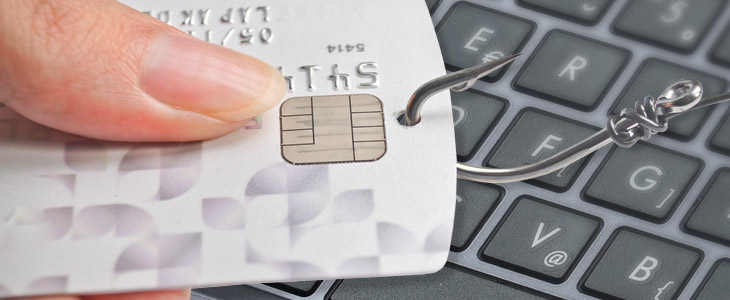
Haben Sie sich schon einmal gewundert, wieso Sie immer mal wieder Mails von bekannten Firmen wie DHL, Amazon oder beliebigen Finanzinstituten erhalten? Sollten Sie auch, vor allem, wenn Sie bislang in keinerlei Geschäftsbeziehung mit dem Absender stehen. Denn oftmals stammen solche Mails eben nicht von dem angegebenen Weltkonzern, sondern von kriminellen Betrügern. In diesem Artikel möchten wir Ihnen einige aktuelle Beispiele zeigen und auch, wie Sie derartige Fälschungen erkennen und sich davor schützen können.
So gehen Phisher vor
Betrüger verwenden gerne die Namen bekannter Firmen. Denn einerseits wirkt der Name vertrauensvoll und andererseits ist die Wahrscheinlichkeit gar nicht mal so gering, dass der Empfänger wirklich Kunde ist. Die Ziele solch gefälschter Mails sind unterschiedlich: mal möchte der Autor „nur“ Daten ausspähen, in anderen Fällen wiederum Ihren PC mit Malware infizieren oder Sie auf verschiedensten Wegen gar um bares Geld entledigen.
Beispiel 1:
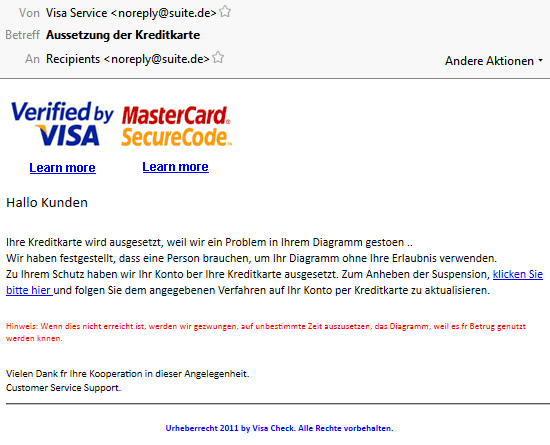
Ein klassischer Phishing-Versuch, zum Glück ein schlechter noch dazu. Auffällig sind vor allem die vielen Fehler, welche auf eine automatische Übersetzung hindeuten. Zudem sollte eine solche Mail direkt von einem Bankunternehmen kommen und dann entweder VISA oder MasterCard Kunden ansprechen.
Apropos Kunde, bestimmt fällt Ihnen auch auf, dass Sie nicht persönlich angesprochen werden. Folgt jemand trotz der offensichtlich gefälschten Mail dem Link, so sollen auf einer ebenso seltsamen Webseite die Kreditkartendaten angegeben werden. Wer das wiederum tut, darf sich am Ende nicht über fremde Abbuchungen beim nächsten Kreditkartenauszug wundern.
Beispiel 2:
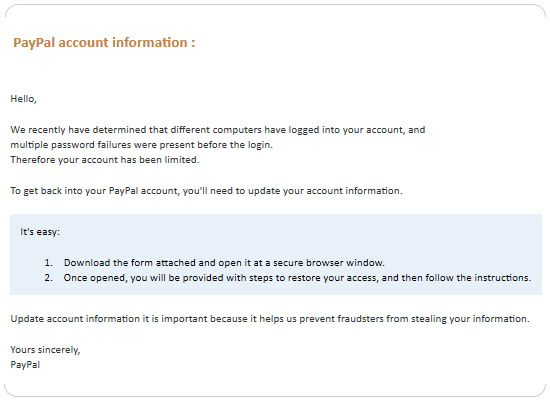
Dieser Versuch ist schon etwas besser und richtet sich vor allem an englischsprachige Empfänger, die den online Bezahldienst Paypal verwenden. Angeblich gab es fehlgeschlagene Login Versuche und nun soll der Empfänger der E-Mail einen Anhang öffnen. Tut er dies, so werden erneut die Kontodaten abgefragt, womit der Betrüger Zugang auf das Paypal Konto erhält.
Da in der Regel Guthaben oder zumindest Bank- oder Kreditkarteninformationen vorhanden sind, ist auch hier das Ziel klar: das Geld wandert fix auf andere Paypal Konten und damit in die Taschen der Kriminellen. Zusätzlich wird auf solch einem Weg auch gerne Malware auf den Rechner geschleust, wenn das ahnungslose Opfer den Anhang öffnet.
Auch bei dieser E-Mail fällt uns auf, dass wir als Kunde nicht direkt angeschrieben werden. Offizielle E-Mails von Paypal beginnen aber immer mit einer direkten Anrede. Zudem wird Sie weder Paypal noch eine andere Firma jemals dazu auffordern, Ihre Login Daten anzugeben und auch Anhänge sind abgesehen von PDFs mehr als selten.
Beispiel 3:
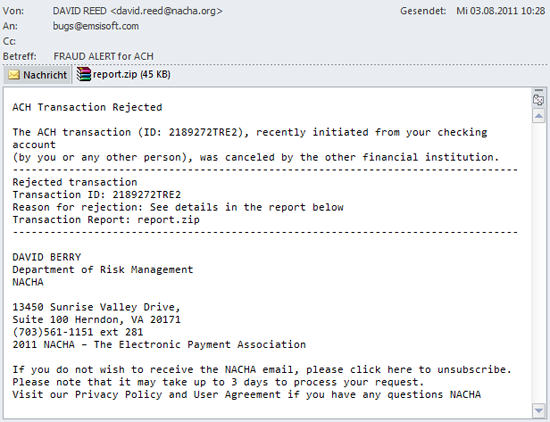
Bei diesem Betrugsversuch wird vor allem auf die Neugierde der Menschen gesetzt. Immerhin geht es offenbar um einen Bank Transfer und ein Anhang ist auch vorhanden. Leider übersehen Empfänger solcher Mails viel zu oft, dass es auch hier keine klare Anrede gibt und es vermutlich auch keine anstehende Überweisung gab. Wirklich professionell sieht das Layout zudem auch nicht aus.
Interessant ist hier die Intention der Betrüger: wieder soll ein Anhang geöffnet werden, welcher hier aus einer als PDF getarnten ZIP Datei besteht. Öffnet man nun die ZIP Datei, verbirgt sich darin die ebenfalls als PDF getarnte ausführbare Datei report485770.pdf.exe.
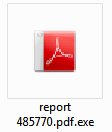
Der Betrüger hat sich sogar die Mühe gemacht, die Datei mit dem Adobe Acrobat Icon zu versehen. Wer darauf reinfällt öffnet echter Malware Tür und Tor auf dem eigenen Rechner – denn hinter der zunächst harmlos aussehenden Datei befindet sich ein Wurm, der von Emsisoft Anti-Malware als Win32.Gamarue erkannt wird.
Wie kann ich mich schützen?
Alle diese Beispiele sind echt und wurden von den Spam Filtern bekannter E-Mail Programme wie Microsoft Outlook oder Thunderbird nicht erkannt. Das Risiko ist sehr hoch, denn bedroht wird fast immer entweder Ihr Geldbeutel oder aber die Sicherheit Ihres Computers und damit die Ihrer Daten.
Eingehende E-Mails sollten Sie insbesondere vor dem Öffnen von Anhängen oder Links immer analysieren. Achten Sie dabei auf die folgenden Punkte:
- In welcher Sprache wurde die E-Mail verfasst? Wenn Sie nur deutsche Anbieter nutzen, erreicht Sie in der Regel auch auf Deutsch verfasster Text.
- Welche E-Mail Adresse hat der Absender verwendet, die Sie im „An“ Feld sehen? Wenn die E-Mail nicht an Ihre exakte Adresse gerichtet ist, handelt es sich mit ziemlicher Sicherheit um einen Betrugsversuch.
- Auch die E-Mail Adresse des Absenders selber sollte Sinn machen. Die meisten Konzerne verwenden Formate wie [email protected] oder zumindest allgemeine Adressen wie [email protected] oder [email protected].
- Werden Sie mit Ihrem Namen angesprochen? Versandhäuser, Freunde und Familienmitglieder wissen wie Sie heißen und werden Ihnen daher personalisierte E-Mails zukommen lassen.
- Wie sieht das Layout aus, ist es professionell und spiegelt die Firmenidentität wieder? Seriöse Versender achten auf Stil und optische Erscheinung, Betrüger selten. Insbesondere Mails mit vielen Schreibfehlern sind eigentlich immer ein Phishing-Versuch.
- Führen enthaltene Links auch wirklich auf die originale Firmenwebseite? Wenn Sie den Mauszeiger über einen Link bewegen, so können Sie das Ziel klar erkennen. Sieht die Webadresse kryptisch aus: Finger weg!
- Um was für eine Datei handelt es sich bei dem Anhang? Normalerweise werden Ihnen maximal PDF oder DOC Dateien zugeschickt, es besteht kein Grund diese als ZIP zu packen. Starten Sie auf keinen Fall ausführbare Dateien! Achten Sie daher immer auf die Dateiendung.

Je mehr Punkte aus der Liste auf eine E-Mail zutreffen, desto wahrscheinlicher ist ein Betrugsversuch. Auch aktiv können Sie sich schützen, wenn Sie die folgenden drei Punkte beachten:
- Lassen Sie sich E-Mails als „Plain Text“ und nicht als HTML anzeigen. Das sieht zwar bei einigen Mails seltsam aus, aber auf diesem Weg erkennen Sie sofort gefälschte Links.
- Sie sollen sich in Ihr Konto einloggen oder eine bestimmte Firma kontaktieren? Folgen Sie keinen Links und öffnen Sie keine Anhänge, sondern geben Sie die Webadresse der betreffenden Firma einfach manuell im Browser ein. Im Zweifelsfall kontaktieren Sie einfach Ihren Ansprechpartner oder den Support, spätestens diese können Sie über die Echtheit einer Mail aufklären.
- Nutzen Sie ein Anti-Virus Programm mit Echtzeitschutz. Emsisoft Anti-Malware schützt Sie beispielsweise dreifach, indem Malware vor der Ausführung entweder durch den leistungsstarken Dual Engine Scanner oder die Verhaltensanalyse blockiert wird. Der Surf-Schutz warnt Sie zusätzlich vor vielen Phishing Webseiten, sobald Sie diese besuchen möchten.
Eine Malware freie Zeit wünscht
Ihr Emsisoft Team